 Taskling
A daily planner shaped like your actual day.
Today is split into Morning, Afternoon, Evening and Anytime, so you can see what belongs where without building a rigid schedule.


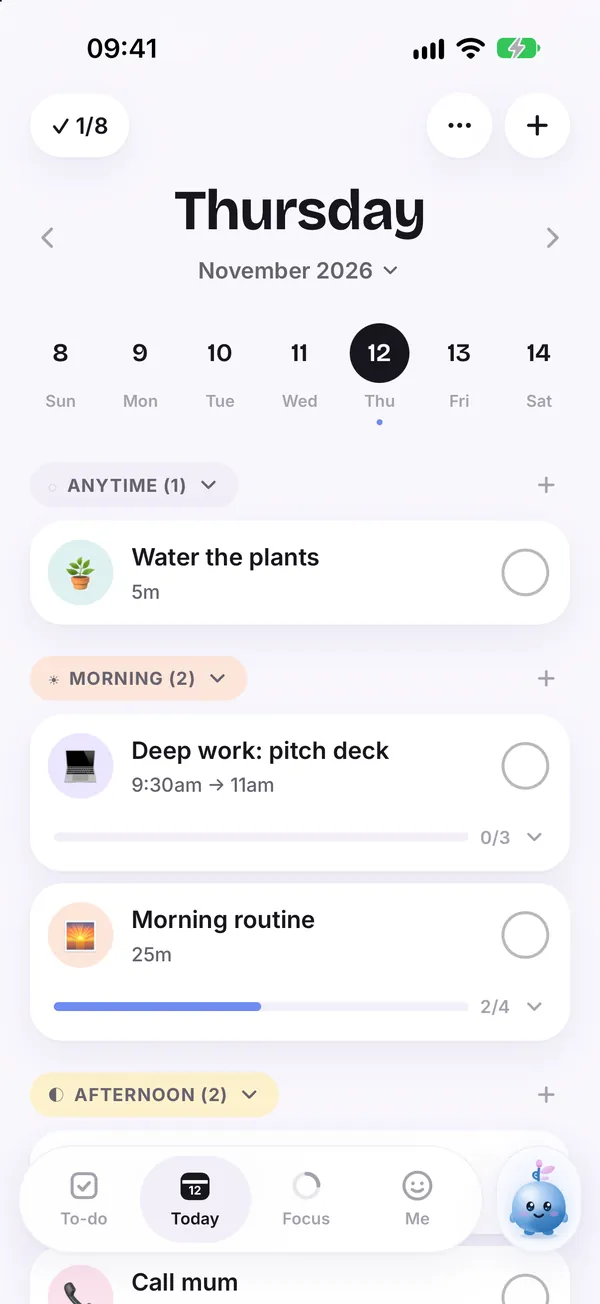
Hour by hour schedules break the moment one thing runs late. Endless lists hide what matters now. A visual day sits between the two: loose enough to bend, clear enough to follow.
How it helps
Four parts of the day
Morning, Afternoon, Evening and Anytime give every task a home, with or without an exact time.
See time
Durations and a timeline show how full the day really is before you overcommit.
Gentle progress
A simple counter and colorful cards show what you have done, with no red overdue badges.
Rolls forward
Unfinished tasks move on to the next day by themselves, so a hard day does not leave a mess.
Good for
- Planning today in a minute
- Seeing a busy week at a glance
- Keeping work and home in one view
Guides on this topic
How to plan your day when everything feels urgent
When every task feels urgent, planning feels impossible. A five minute method to empty your head, pick what matters and give the rest a place.
5 min read
Free daily planner template you can copy today
A simple, free daily planner template built around Morning, Afternoon, Evening and Anytime, with space for a top three and a quick brain dump.
5 min read
Time blocking for beginners: a gentle guide
Time blocking means giving tasks a place on your day instead of a list. A beginner friendly way to try it, including a softer version for days that never go to plan.
6 min readQuestions
Is daily planning free?
Yes. Planning your day on the Today screen is free. Taskling Plus unlocks the rest of the app.
Can I see my plan without opening the app?
Yes. Taskling has Today, Progress and Quick add widgets for the home and lock screen.