 Taskling
Big task? See the very next step.
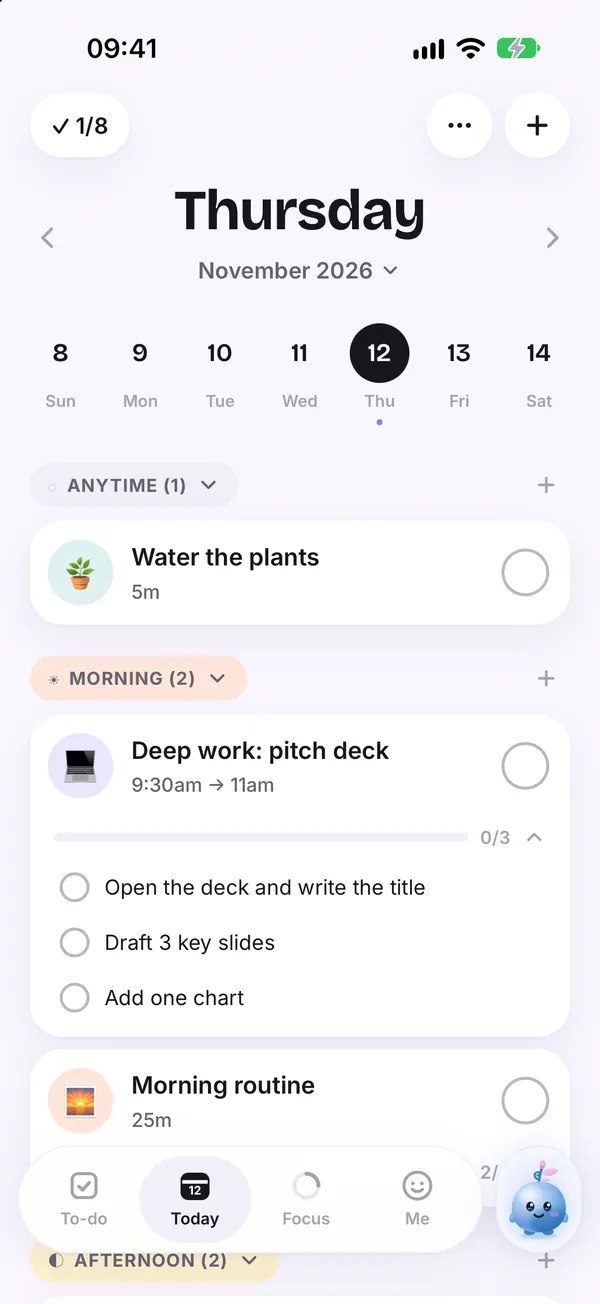
Taskling breaks a large task into small steps, so instead of "pitch deck" you see "open the deck and write the title".

A task that is too big or too vague is hard to start, because your brain cannot see where to begin. Breaking it into steps makes the first action obvious and small enough to begin right away.
How it helps
Steps inside the task
Each task can hold a short checklist of steps, right on your Today screen.
Sprig can draft them
Ask Sprig to break a task down and edit the steps it suggests.
Progress on the card
The task shows how many steps are done, so momentum stays visible.
One step at a time
You only need the next step, not the whole plan, to get moving.
Good for
- Assignments and reports
- Cleaning a room that has got out of hand
- Admin you keep putting off
Guides on this topic
How to break a big task into small steps
A simple five part method for turning any big, scary task into small steps you can actually start, with a worked example.
5 min read
Task paralysis: how to start when you can't start
Task paralysis is the stuck feeling before a task even begins. Here is why it happens and eight small, practical ways to get moving again.
6 min read
How to stop procrastinating: what actually works
Procrastination is about feelings, not laziness or time management. A research backed guide to why you put things off and seven ways to start today.
7 min readQuestions
How small should a step be?
Small enough that you could start it in the next two minutes without thinking.
Can I write my own steps?
Yes. You can add, edit or remove steps yourself at any time.